Trong Phần 1, mình đã chia sẻ cách thiết lập hệ thống comment với Cloudflare D1 + Drizzle. Sang Phần 2, mình tối ưu hiệu năng bằng KV cache và index để giảm tải cho database.
Tuy nhiên, hệ thống vẫn còn thiếu một mảnh ghép rất quan trọng: trang quản trị để duyệt comment.
Khi không có trang quản trị, để xem và duyệt comment mới, mình phải truy cập vào Cloudflare Dashboard, tìm đến phần D1 Dashboard để xem database và cập nhật thủ công cho từng comment mới.
Hoặc phải xử lý bằng wranger CLI
# Xem tất cả comment đang pendingnpx wrangler d1 execute blog-thuanbui-comments --remote \  --command "SELECT id, post_slug, author_name, author_email, substr(content, 1, 100) as preview, created_at FROM comments WHERE status = 0 ORDER BY created_at DESC"
# Approve và thêm email vào trusted list luôn (lần sau auto-approve)npx wrangler d1 execute blog-thuanbui-comments --remote \  --command "UPDATE comments SET status = 1 WHERE id = 5"
npx wrangler d1 execute blog-thuanbui-comments --remote \  --command "INSERT OR IGNORE INTO trusted_emails (email, added_at) VALUES ('reader@example.com', datetime('now'))"
# Xóa comment (soft delete)npx wrangler d1 execute blog-thuanbui-comments --remote \  --command "UPDATE comments SET status = 2 WHERE id = 5"
Cả hai phương án hiện tại đều bất tiện, không phù hợp sử dụng lâu dài.
Trong Phần 3 hôm nay, mình sẽ chia sẻ cách xây dựng một Admin Dashboard cho hệ thống comment trên Astro, gồm các chức năng:
- Xem danh sách comment theo trạng thái
pending,approved,trash - Lọc comment theo
slugbài viết - Approve, sửa nội dung, đưa vào thùng rác hoặc xóa vĩnh viễn
- Trả lời comment trực tiếp với tư cách admin
- Quản lý danh sách
trusted_emails - Bảo vệ toàn bộ khu vực quản trị bằng Cloudflare Zero Trust
Toàn bộ giải pháp vẫn theo đúng mục tiêu ban đầu khu chuyển blog từ WordPress qua Astro:
- Không cần VPS
- Không phụ thuộc dịch vụ comment bên thứ ba
- Tất cả nằm trong hệ sinh thái Cloudflare
I. Bài toán quản trị comment
Sau khi hệ thống comment đã hoạt động ổn định, mình cần giải quyết thêm một số nhu cầu thực tế phát sinh
- Comment mới từ email lạ cần được duyệt trước khi hiển thị
- Cần tính năng trả lời khi duyệt comment.
- Cần tính năng chỉnh sửa lại comment khi cần, tránh tình trạng spam link cờ bạc, affiliate,…
- Cần quản lý danh sách email tin cậy để các comment sau được auto-approve
Hiện tại chỉ với 2 public GET /api/comments/{slug} và POST /api/comments/{slug} thì chưa đủ để xử lý các nhu cầu này.
Mình cần phải xây dựng một khu vực quản trị riêng, chỉ mình truy cập được, UI đơn giản, dễ thao tác.
II. Kiến trúc tổng thể của dashboard
Hệ thống quản trị được chia làm 3 phần
- Route admin để tải giao diện front end
- Admin API để thao tác với comment và trusted emails
- Cloudflare Zero Trust để bảo vệ đường dẫn quản trị
Sơ đồ hệ thống comment sẽ như sau
Astro app (Cloudflare Workers)  ├── /admin/[...slug].astro                ← route admin  ├── AdminDashboard.svelte                 ← UI quản trị  ├── /api/admin/comments                   ← list comment có filter + pagination  ├── /api/admin/comments/[id]              ← approve / edit / trash / delete  ├── /api/admin/comments/reply             ← reply với tư cách admin  ├── /api/admin/trusted-emails             ← list + add trusted email  └── /api/admin/trusted-emails/[id]        ← update / delete trusted email
Cloudflare D1  ├── comments  └── trusted_emails
Cloudflare KV  └── comments:{slug}                       ← cache public comments
Cloudflare Zero Trust  ├── bảo vệ /admin/*  └── bảo vệ /api/admin/*
III. Sử dụng Cloudflare Zero Trust để bảo vệ trang quản trị
Việc xác thực truy cập vào admin dashboard sẽ được giao cho Cloudflare Zero Trust xử lý, giúp đơn giản hoá phần xác thực tài khoản:
- Không cần session
- Không cần JWT
- Không cần bảng
users - Không cần xử lý password reset, cookie, CSRF cho khu vực admin
Khi thiết lập Zero Trust, mình sẽ bảo vệ 2 nhóm đường dẫn:
/admin/*/api/admin/*
Luồng hoạt động sẽ như sau:
Truy cập /admin/comments → Cloudflare Access kiểm tra quyền truy cập → Nếu chưa xác thực: yêu cầu login bằng email → Nếu đã xác thực: cho vào dashboard → Dashboard gọi /api/admin/*Nhờ vậy, toàn bộ trang quản trị được bảo vệ, ngăn chặn truy cập trái phép.
Nếu bạn muốn tìm hiểu chi tiết hơn về cách thiết lập Cloudflare Access, có thể xem lại bài cũ của mình về Zero Trust bên dưới
IV. Tạo route cho Admin Dashboard
Mình tạo route admin bằng file src/pages/admin/[...slug].astro.
---export const prerender = false;import AdminDashboard from "@/components/admin/AdminDashboard.svelte";
type View = "comments" | "trusted-emails";
const VIEWS: Record<string, { view: View; title: string }> = {  comments: { view: "comments", title: "Comments" },  "trusted-emails": { view: "trusted-emails", title: "Trusted Emails" },};
const slug = Astro.params.slug ?? "comments";
if (!(slug in VIEWS)) {  return Astro.redirect("/404", 404);}
const { view: initialView, title: pageTitle } = VIEWS[slug];---
<!doctype html><html lang="en">  <head>    <meta charset="UTF-8" />    <meta name="viewport" content="width=device-width, initial-scale=1.0" />    <meta name="robots" content="noindex, nofollow" />    <title>{pageTitle} — Admin Dashboard</title>    <script src="https://cdn.jsdelivr.net/npm/@tailwindcss/browser@4"></script>    <link      href="https://cdn.jsdelivr.net/npm/daisyui@5"      rel="stylesheet"      type="text/css"    />  </head>  <body class="bg-base-100 text-base-content min-h-screen antialiased">    <AdminDashboard client:only="svelte" view={initialView} />  </body></html>
Phần component AdminDashboard được khai báo client:only="svelte", tức là toàn bộ phần UI của trang admin sẽ chạy ở client, không cần phải render trước trên server.
V. Xây dựng giao diện dashboard bằng Svelte
Toàn bộ phần UI nằm trong src/components/admin/AdminDashboard.svelte.
Dashboard có 2 tab chính:
- Comments
- Trusted Emails
Sidebar riêng được tách ra thành AdminSidebar.svelte, còn phân trang được tách thành Pagination.svelte.
Toàn bộ nội dung file AdminDashboard.svelte
<script lang="ts"> import { onMount, untrack } from "svelte"; import Pagination from "@/components/admin/Pagination.svelte"; import AdminSidebar from "./AdminSidebar.svelte";
// ── Types ────────────────────────────────────────────────────────────── interface Comment { id: number; postSlug: string; authorName: string; authorEmail: string; authorUrl: string | null; content: string; createdAt: string; status: number; parentId: number | null; }
interface TrustedEmail { id: number; email: string; addedAt: string; }
type StatusFilter = "all" | "pending" | "approved" | "trash"; type View = "comments" | "trusted-emails";
interface Props { view: View; }
let { view }: Props = $props();
// Current view — mutable so Svelte can switch tabs without full page reload let currentView = $state<View>(untrack(() => view));
// Track which views have been loaded at least once const loadedViews = new Set<View>();
function navigate(newView: View) { currentView = newView; const path = newView === "trusted-emails" ? "/admin/trusted-emails" : "/admin/comments"; history.pushState({ view: newView }, "", path); // Lazy-load on first visit to this view if (!loadedViews.has(newView)) { if (newView === "comments") loadComments(); else loadEmails(); } }
// Mobile sidebar open state let sidebarOpen = $state(false);
// Comments state let commentsList = $state<Comment[]>([]); let commentsLimit = $state(10); let commentsCursors = $state<Array<number | null>>([null]); let commentsHasMore = $state(false); let commentsNextCursor = $state<number | null>(null); let statusFilter = $state<StatusFilter>("pending"); let slugSearch = $state(""); let commentsLoading = $state(false);
// Edit state let editingComment = $state<Comment | null>(null); let editContent = $state(""); let editAuthorName = $state(""); let editAuthorEmail = $state(""); let editAuthorUrl = $state("");
// Reply state let replyingTo = $state<Comment | null>(null); let replyContent = $state("");
// Trusted emails state let emailsList = $state<TrustedEmail[]>([]); let emailsCursors = $state<Array<number | null>>([null]); let emailsHasMore = $state(false); let emailsNextCursor = $state<number | null>(null); let emailsLoading = $state(false); let newEmail = $state(""); let editingEmail = $state<TrustedEmail | null>(null); let editEmailValue = $state("");
// Feedback let message = $state(""); let messageType = $state<"success" | "error">("success");
// ── Helpers ──────────────────────────────────────────────────────────── function showMessage(msg: string, type: "success" | "error" = "success") { message = msg; messageType = type; setTimeout(() => (message = ""), 3500); }
function formatDate(iso: string) { return new Date(iso).toLocaleString("en-US", { year: "numeric", month: "short", day: "numeric", hour: "2-digit", minute: "2-digit", }); }
let commentsHasPrev = $derived(commentsCursors.length > 1); let emailsHasPrev = $derived(emailsCursors.length > 1);
// ── API: Comments ────────────────────────────────────────────────────── async function loadComments() { commentsLoading = true; loadedViews.add("comments"); const cursor = commentsCursors[commentsCursors.length - 1]; try { const params = new URLSearchParams({ limit: String(commentsLimit) }); if (statusFilter !== "all") params.set("status", statusFilter); if (slugSearch.trim()) params.set("slug", slugSearch.trim()); if (cursor !== null) params.set("cursor", String(cursor));
const res = await fetch(`/api/admin/comments?${params}`); if (!res.ok) throw new Error("Failed to load comments"); const data = (await res.json()) as any; commentsList = data.comments ?? []; commentsHasMore = data.hasMore ?? false; commentsNextCursor = data.nextCursor ?? null; } catch { showMessage("Failed to load comments", "error"); } finally { commentsLoading = false; } }
function commentsGoNext() { if (!commentsNextCursor) return; commentsCursors = [...commentsCursors, commentsNextCursor]; loadComments(); }
function commentsGoPrev() { if (commentsCursors.length <= 1) return; commentsCursors = commentsCursors.slice(0, -1); loadComments(); }
async function updateComment( id: number, updates: { status?: number; content?: string; authorName?: string; authorEmail?: string; authorUrl?: string | null; } ) { try { const res = await fetch(`/api/admin/comments/${id}`, { method: "PATCH", headers: { "Content-Type": "application/json" }, body: JSON.stringify(updates), }); if (!res.ok) { const data = (await res.json()) as any; throw new Error(data.error || "Failed to update"); } showMessage("Comment updated successfully"); await loadComments(); } catch (err: any) { showMessage(err.message || "Failed to update", "error"); } }
async function deleteComment(id: number) { if (!confirm("Permanently delete this comment? This cannot be undone.")) return; try { const res = await fetch(`/api/admin/comments/${id}`, { method: "DELETE", }); if (!res.ok) throw new Error("Failed to delete"); showMessage("Comment permanently deleted"); await loadComments(); } catch { showMessage("Failed to delete comment", "error"); } }
async function submitReply() { if (!replyingTo || !replyContent.trim()) return; try { const res = await fetch("/api/admin/comments/reply", { method: "POST", headers: { "Content-Type": "application/json" }, body: JSON.stringify({ postSlug: replyingTo.postSlug, parentId: replyingTo.id, content: replyContent.trim(), }), }); if (!res.ok) { const data = (await res.json()) as any; throw new Error(data.error || "Failed to post reply"); } showMessage("Reply posted successfully"); replyingTo = null; replyContent = ""; await loadComments(); } catch (err: any) { showMessage(err.message || "Failed to post reply", "error"); } }
function saveEdit() { if (!editingComment) return; updateComment(editingComment.id, { content: editContent, authorName: editAuthorName.trim() || undefined, authorEmail: editAuthorEmail.trim() || undefined, authorUrl: editAuthorUrl.trim() || null, }); editingComment = null; editContent = ""; editAuthorName = ""; editAuthorEmail = ""; editAuthorUrl = ""; }
// ── API: Trusted Emails ──────────────────────────────────────────────── async function loadEmails() { emailsLoading = true; loadedViews.add("trusted-emails"); const cursor = emailsCursors[emailsCursors.length - 1]; try { const params = new URLSearchParams({ limit: String(commentsLimit) }); if (cursor !== null) params.set("cursor", String(cursor)); const res = await fetch(`/api/admin/trusted-emails?${params}`); if (!res.ok) throw new Error("Failed to load emails"); const data = (await res.json()) as any; emailsList = data.emails ?? []; emailsHasMore = data.hasMore ?? false; emailsNextCursor = data.nextCursor ?? null; } catch { showMessage("Failed to load trusted emails", "error"); } finally { emailsLoading = false; } }
function emailsGoNext() { if (!emailsNextCursor) return; emailsCursors = [...emailsCursors, emailsNextCursor]; loadEmails(); }
function emailsGoPrev() { if (emailsCursors.length <= 1) return; emailsCursors = emailsCursors.slice(0, -1); loadEmails(); }
async function addEmail() { if (!newEmail.trim()) return; try { const res = await fetch("/api/admin/trusted-emails", { method: "POST", headers: { "Content-Type": "application/json" }, body: JSON.stringify({ email: newEmail.trim() }), }); if (!res.ok) { const data = (await res.json()) as any; throw new Error(data.error || "Failed to add email"); } showMessage("Email added to trusted list"); newEmail = ""; await loadEmails(); } catch (err: any) { showMessage(err.message || "Failed to add email", "error"); } }
async function updateEmail(id: number) { if (!editEmailValue.trim()) return; try { const res = await fetch(`/api/admin/trusted-emails/${id}`, { method: "PATCH", headers: { "Content-Type": "application/json" }, body: JSON.stringify({ email: editEmailValue.trim() }), }); if (!res.ok) { const data = (await res.json()) as any; throw new Error(data.error || "Failed to update email"); } showMessage("Email updated"); editingEmail = null; editEmailValue = ""; await loadEmails(); } catch (err: any) { showMessage(err.message || "Failed to update email", "error"); } }
async function deleteEmail(id: number) { if (!confirm("Remove this email from trusted list?")) return; try { const res = await fetch(`/api/admin/trusted-emails/${id}`, { method: "DELETE", }); if (!res.ok) throw new Error("Failed to remove email"); showMessage("Email removed from trusted list"); await loadEmails(); } catch { showMessage("Failed to remove email", "error"); } }
// Load on mount onMount(() => { // Only load the initially active view if (currentView === "comments") loadComments(); else loadEmails();
const handlePopState = (e: PopStateEvent) => { const next = (e.state?.view as View) ?? "comments"; currentView = next; if (!loadedViews.has(next)) { if (next === "comments") loadComments(); else loadEmails(); } }; window.addEventListener("popstate", handlePopState); return () => window.removeEventListener("popstate", handlePopState); });
// Debounced slug search let slugTimeout: ReturnType<typeof setTimeout>; function handleSlugSearch(e: Event) { slugSearch = (e.target as HTMLInputElement).value; clearTimeout(slugTimeout); slugTimeout = setTimeout(() => { commentsCursors = [null]; loadComments(); }, 400); }</script>
<!-- ── Toast notification ─────────────────────────────────────────────── -->{#if message} <div class="alert {messageType === 'success' ? 'alert-success' : 'alert-error'} fixed top-4 right-4 z-50 shadow" > <span class="text-base">{messageType === "success" ? "✓" : "✕"}</span> {message} </div>{/if}
<!-- ── Sidebar layout ────────────────────────────────────────────────── --><div class="drawer lg:drawer-open"> <input id="admin-drawer" type="checkbox" class="drawer-toggle" bind:checked={sidebarOpen} /> <div class="drawer-content min-h-screen"> <!-- Mobile top bar --> <div class="lg:hidden flex items-center gap-3 p-4 border-b border-base-300 bg-base-100" > <label for="admin-drawer" class="btn btn-ghost btn-sm drawer-button"> <svg class="w-5 h-5" fill="none" stroke="currentColor" viewBox="0 0 24 24" > <path stroke-linecap="round" stroke-linejoin="round" stroke-width="2" d="M4 6h16M4 12h16M4 18h16" /> </svg> </label> <span class="font-semibold">Admin Dashboard</span> </div>
<!-- Main content --> <div class="p-6"> <!-- Comments View --> {#if currentView === "comments"} <!-- Filter bar --> <div class="mb-5 flex flex-wrap items-center gap-3"> <!-- Status pills --> <div class="join"> {#each [["all", "All"], ["pending", "Pending"], ["approved", "Approved"], ["trash", "Trash"]] as [value, label]} <button onclick={() => { statusFilter = value as StatusFilter; commentsCursors = [null]; loadComments(); }} class="join-item btn {statusFilter === value ? 'btn-active' : ''}" > {label} </button> {/each} </div>
<!-- Slug search --> <div class="join"> <input type="text" placeholder="Filter by slug..." value={slugSearch} oninput={handleSlugSearch} class="join-item input input-bordered w-48" /> </div>
<span class="ml-auto text-xs text-base-content/60"> {#if commentsList.length === 0} 0 results {:else} {commentsList.length} comments {#if commentsHasPrev || commentsHasMore} · page {commentsCursors.length} {/if} {/if} </span> </div>
<div class="card bg-base-100"> {#if commentsLoading} <div class="flex items-center justify-center py-16 text-base-content/60" > <span class="loading loading-spinner loading-sm mr-2"></span> Loading comments... </div> {:else if commentsList.length === 0} <div class="flex flex-col items-center justify-center gap-2 py-16 text-base-content/60" > <span class="text-3xl">💬</span> <p class="text-sm">No comments found</p> </div> {:else} <div class="space-y-4"> {#each commentsList as comment (comment.id)} <div class="card bg-base-100 border border-base-300 shadow-sm group {comment.status !== 1 ? 'bg-warning/10 border-warning/90' : ''}" > <div class="card-body p-4"> <!-- Header: name, email/website, date, post slug --> <div class="flex flex-wrap items-start justify-between gap-2 mb-2" > <div> <div class="flex items-center gap-2"> <span class="font-semibold text-base-content" >{comment.authorName}</span > </div> <div class="text-xs text-base-content/60 mt-0.5"> {comment.authorEmail}{#if comment.authorUrl} · <a href={comment.authorUrl} target="_blank" class="hover:underline">{comment.authorUrl}</a >{/if} </div> </div> <div class="text-xs text-base-content/60 text-right"> <div> #{comment.id} · {formatDate(comment.createdAt)} on <a href="/{comment.postSlug}" target="_blank" class="text-primary hover:underline" title={comment.postSlug} > {comment.postSlug.length > 32 ? comment.postSlug.slice(0, 32) + "…" : comment.postSlug} </a> </div> {#if comment.parentId} <div class="text-base-content/50"> ↩ reply to #{comment.parentId} </div> {/if} </div> </div>
<!-- Content --> <p class="text-sm leading-relaxed text-base-content/80 mb-3" > {comment.content} </p>
<!-- Action buttons --> <div class="flex flex-wrap gap-2 pt-2 border-t border-base-200 opacity-0 group-hover:opacity-100 transition-opacity" > {#if statusFilter === "trash"} <!-- Trash tab: restore or permanently delete --> <button onclick={() => updateComment(comment.id, { status: 1 })} class="btn btn-sm btn-outline btn-success" >Restore</button > <button onclick={() => deleteComment(comment.id)} class="btn btn-sm btn-outline btn-error" >Delete</button > {:else} <!-- All other tabs: approve, edit, reply, trash --> {#if comment.status !== 1} <button onclick={() => updateComment(comment.id, { status: 1 })} class="btn btn-sm btn-outline btn-success" >Approve</button > {/if} <button onclick={() => { editingComment = comment; editContent = comment.content; editAuthorName = comment.authorName; editAuthorEmail = comment.authorEmail; editAuthorUrl = comment.authorUrl ?? ""; }} class="btn btn-sm btn-outline">Edit</button > <button onclick={() => { replyingTo = comment; replyContent = ""; }} class="btn btn-sm btn-outline">Reply</button > {#if comment.status !== 2} <button onclick={() => updateComment(comment.id, { status: 2 })} class="btn btn-sm btn-outline btn-error" >Trash</button > {/if} {/if} </div> </div> </div> {/each} </div>
<!-- Pagination --> <Pagination hasPrev={commentsHasPrev} hasNext={commentsHasMore} onPrev={commentsGoPrev} onNext={commentsGoNext} /> {/if} </div>
<!-- ── Edit Modal ──────────────────────────────────────────────── --> {#if editingComment} <div class="fixed inset-0 z-50 flex items-center justify-center bg-black/60 backdrop-blur-sm p-4" onclick={e => { if (e.target === e.currentTarget) editingComment = null; }} onkeydown={e => { if (e.key === "Escape") editingComment = null; }} role="dialog" aria-modal="true" aria-labelledby="edit-modal-title" tabindex="-1" > <div class="w-full max-w-lg rounded-2xl border border-base-300 bg-base-100 p-6 shadow-2xl" > <div class="mb-5 flex items-start justify-between gap-4"> <div> <h3 id="edit-modal-title" class="text-base font-semibold"> Edit Comment #{editingComment.id} </h3> <p class="mt-0.5 text-xs text-base-content/60"> By <strong>{editingComment.authorName}</strong> on <code class="rounded bg-base-200 px-1 py-0.5 text-xs" >{editingComment.postSlug}</code > </p> </div> <button onclick={() => { editingComment = null; }} class="btn btn-ghost btn-sm">✕</button > </div> <div class="space-y-3 mb-4"> <div> <label for="edit-author-name" class="label py-0.5" ><span class="label-text text-xs font-medium">Name</span ></label > <input id="edit-author-name" type="text" bind:value={editAuthorName} class="input input-bordered w-full px-3 py-2 text-sm" /> </div> <div> <label for="edit-author-email" class="label py-0.5" ><span class="label-text text-xs font-medium">Email</span ></label > <input id="edit-author-email" type="email" bind:value={editAuthorEmail} class="input input-bordered w-full px-3 py-2 text-sm" /> </div> <div> <label for="edit-author-url" class="label py-0.5" ><span class="label-text text-xs font-medium">Website</span ></label > <input id="edit-author-url" type="url" bind:value={editAuthorUrl} placeholder="https://example.com" class="input input-bordered w-full px-3 py-2 text-sm" /> </div> </div> <textarea bind:value={editContent} rows="6" class="textarea textarea-bordered w-full resize-y px-3 py-2.5 text-sm leading-relaxed" ></textarea> <div class="mt-4 flex justify-end gap-2"> <button onclick={() => { editingComment = null; }} class="btn btn-ghost">Cancel</button > <button onclick={saveEdit} class="btn btn-primary" >Save Changes</button > </div> </div> </div> {/if}
<!-- ── Reply Modal ──────────────────────────────────────────────── --> {#if replyingTo} <div class="fixed inset-0 z-50 flex items-center justify-center bg-black/60 backdrop-blur-sm p-4" onclick={e => { if (e.target === e.currentTarget) replyingTo = null; }} onkeydown={e => { if (e.key === "Escape") replyingTo = null; }} role="dialog" aria-modal="true" aria-labelledby="reply-modal-title" tabindex="-1" > <div class="w-full max-w-lg rounded-2xl border border-base-300 bg-base-100 p-6 shadow-2xl" > <div class="mb-5 flex items-start justify-between gap-4"> <div> <h3 id="reply-modal-title" class="text-base font-semibold"> Reply as Admin </h3> <p class="mt-0.5 text-xs text-base-content/60"> Replying to <strong>{replyingTo.authorName}</strong> on <code class="rounded bg-base-200 px-1 py-0.5 text-xs" >{replyingTo.postSlug}</code > </p> </div> <button onclick={() => { replyingTo = null; }} class="btn btn-ghost btn-sm">✕</button > </div> <div class="mb-4 rounded-lg border border-base-300 bg-base-200 px-4 py-3" > <div class="mb-1 text-xs font-medium text-base-content/60"> {replyingTo.authorName} wrote: </div> <p class="text-xs leading-relaxed text-base-content/60 line-clamp-4" > {replyingTo.content} </p> </div> <textarea bind:value={replyContent} rows="4" placeholder="Write your reply..." class="textarea textarea-bordered w-full resize-y px-3 py-2.5 text-sm leading-relaxed" ></textarea> <div class="mt-4 flex justify-end gap-2"> <button onclick={() => { replyingTo = null; }} class="btn btn-ghost">Cancel</button > <button onclick={submitReply} disabled={!replyContent.trim()} class="btn btn-primary">Post Reply</button > </div> </div> </div> {/if} {/if}
<!-- Trusted Emails View --> {#if currentView === "trusted-emails"} <!-- Add email card --> <div class="card bg-base-100 shadow mb-6"> <div class="card-body"> <h3 class="card-title text-sm">Add Trusted Email</h3> <div class="flex gap-2"> <input type="email" placeholder="email@example.com" bind:value={newEmail} onkeydown={e => e.key === "Enter" && addEmail()} class="input input-bordered flex-1 px-3 py-2 text-sm" /> <button onclick={addEmail} disabled={!newEmail.trim()} class="btn btn-primary">Add Email</button > </div> <p class="text-xs text-base-content/60"> Comments from trusted emails are automatically approved. </p> </div> </div>
<!-- Emails list --> <div class="card bg-base-100"> {#if emailsLoading} <div class="flex items-center justify-center py-16 text-sm text-base-content/60" > <span class="loading loading-spinner loading-sm mr-2"></span> Loading... </div> {:else if emailsList.length === 0} <div class="flex flex-col items-center justify-center gap-2 py-16 text-base-content/60" > <span class="text-3xl">✉️</span> <p class="text-sm">No trusted emails yet</p> </div> {:else} <div class="space-y-2"> {#each emailsList as email (email.id)} <div class="flex flex-wrap items-center justify-between gap-3 px-4 py-3 bg-base-100 border border-base-300 rounded-lg hover:border-base-400 transition-colors group" > <div class="flex flex-wrap items-center gap-3 min-w-0"> <span class="font-medium text-base-content truncate" >{email.email}</span > <span class="text-xs text-base-content/60 shrink-0" >Added {formatDate(email.addedAt)}</span > </div> {#if editingEmail?.id === email.id} <div class="flex items-center gap-2 shrink-0"> <input type="email" bind:value={editEmailValue} onkeydown={e => e.key === "Enter" && updateEmail(email.id)} class="input input-bordered input-sm px-3 py-1.5 text-sm w-48" /> <button onclick={() => updateEmail(email.id)} class="btn btn-sm btn-outline btn-success">Save</button > <button onclick={() => { editingEmail = null; }} class="btn btn-sm btn-outline">Cancel</button > </div> {:else} <div class="flex items-center gap-2 shrink-0 opacity-0 group-hover:opacity-100 transition-opacity" > <button onclick={() => { editingEmail = email; editEmailValue = email.email; }} class="btn btn-sm btn-outline">Edit</button > <button onclick={() => deleteEmail(email.id)} class="btn btn-sm btn-outline btn-error">Remove</button > </div> {/if} </div> {/each}
<Pagination hasPrev={emailsHasPrev} hasNext={emailsHasMore} onPrev={emailsGoPrev} onNext={emailsGoNext} /> </div> {/if} </div> {/if} </div> </div>
<!-- Sidebar --> <div class="drawer-side z-50"> <label for="admin-drawer" class="drawer-overlay"></label> <AdminSidebar activeView={currentView} onNavigate={navigate} /> </div></div>Toàn bộ nội dung file AdminSidebar.svelte
<script lang="ts">  type View = "comments" | "trusted-emails";
  interface Props {    activeView: View;    onNavigate: (view: View) => void;  }
  let { activeView, onNavigate }: Props = $props();</script>
<aside  class="w-72 min-h-screen bg-base-100 border-r border-base-300 flex flex-col">  <!-- Logo / Brand -->  <div class="p-6 border-b border-base-300">    <h1 class="text-xl font-bold tracking-tight">Admin</h1>    <p class="text-xs text-base-content/60 mt-0.5">Dashboard</p>  </div>
  <!-- Navigation -->  <nav class="flex-1 p-4">    <div class="flex flex-col gap-1">      <button        onclick={() => onNavigate("comments")}        class="flex items-center gap-3 w-full px-4 py-3 rounded-lg text-sm font-medium text-left transition-colors {activeView ===        'comments'          ? 'bg-neutral text-neutral-content'          : 'hover:bg-base-200'}"      >        <svg          class="w-5 h-5"          fill="none"          stroke="currentColor"          viewBox="0 0 24 24"        >          <path            stroke-linecap="round"            stroke-linejoin="round"            stroke-width="2"            d="M8 12h.01M12 12h.01M16 12h.01M21 12c0 4.418-4.03 8-9 8a9.863 9.863 0 01-4.255-.949L3 20l1.395-3.72C3.512 15.042 3 13.574 3 12c0-4.418 4.03-8 9-8s9 3.582 9 8z"          />        </svg>        Comments      </button>      <button        onclick={() => onNavigate("trusted-emails")}        class="flex items-center gap-3 w-full px-4 py-3 rounded-lg text-sm font-medium text-left transition-colors {activeView ===        'trusted-emails'          ? 'bg-neutral text-neutral-content'          : 'hover:bg-base-200'}"      >        <svg          class="w-5 h-5"          fill="none"          stroke="currentColor"          viewBox="0 0 24 24"        >          <path            stroke-linecap="round"            stroke-linejoin="round"            stroke-width="2"            d="M3 8l7.89 5.26a2 2 0 002.22 0L21 8M5 19h14a2 2 0 002-2V7a2 2 0 00-2-2H5a2 2 0 00-2 2v10a2 2 0 002 2z"          />        </svg>        Trusted Emails      </button>    </div>  </nav>
  <!-- Back to site -->  <div class="p-4 border-t border-base-300">    <a href="/" class="btn btn-ghost btn-sm w-full justify-start gap-2">      <svg        class="w-4 h-4"        fill="none"        stroke="currentColor"        viewBox="0 0 24 24"      >        <path          stroke-linecap="round"          stroke-linejoin="round"          stroke-width="2"          d="M10 19l-7-7m0 0l7-7m-7 7h18"        />      </svg>      Back to site    </a>  </div></aside>
Toàn bộ nội dung file Pagination.svelte
<script lang="ts">  type Props = {    hasPrev: boolean;    hasNext: boolean;    onPrev: () => void;    onNext: () => void;  };
  let { hasPrev, hasNext, onPrev, onNext }: Props = $props();</script>
{#if hasPrev || hasNext}  <div class="my-8 flex justify-center">    <div class="join">      <button        onclick={onPrev}        disabled={!hasPrev}        class="join-item btn btn-sm"        aria-label="Goto Previous Page"      >        ← Prev      </button>      <button        onclick={onNext}        disabled={!hasNext}        class="join-item btn btn-sm"        aria-label="Goto Next Page"      >        Next →      </button>    </div>  </div>{/if}
1. Tab Comments
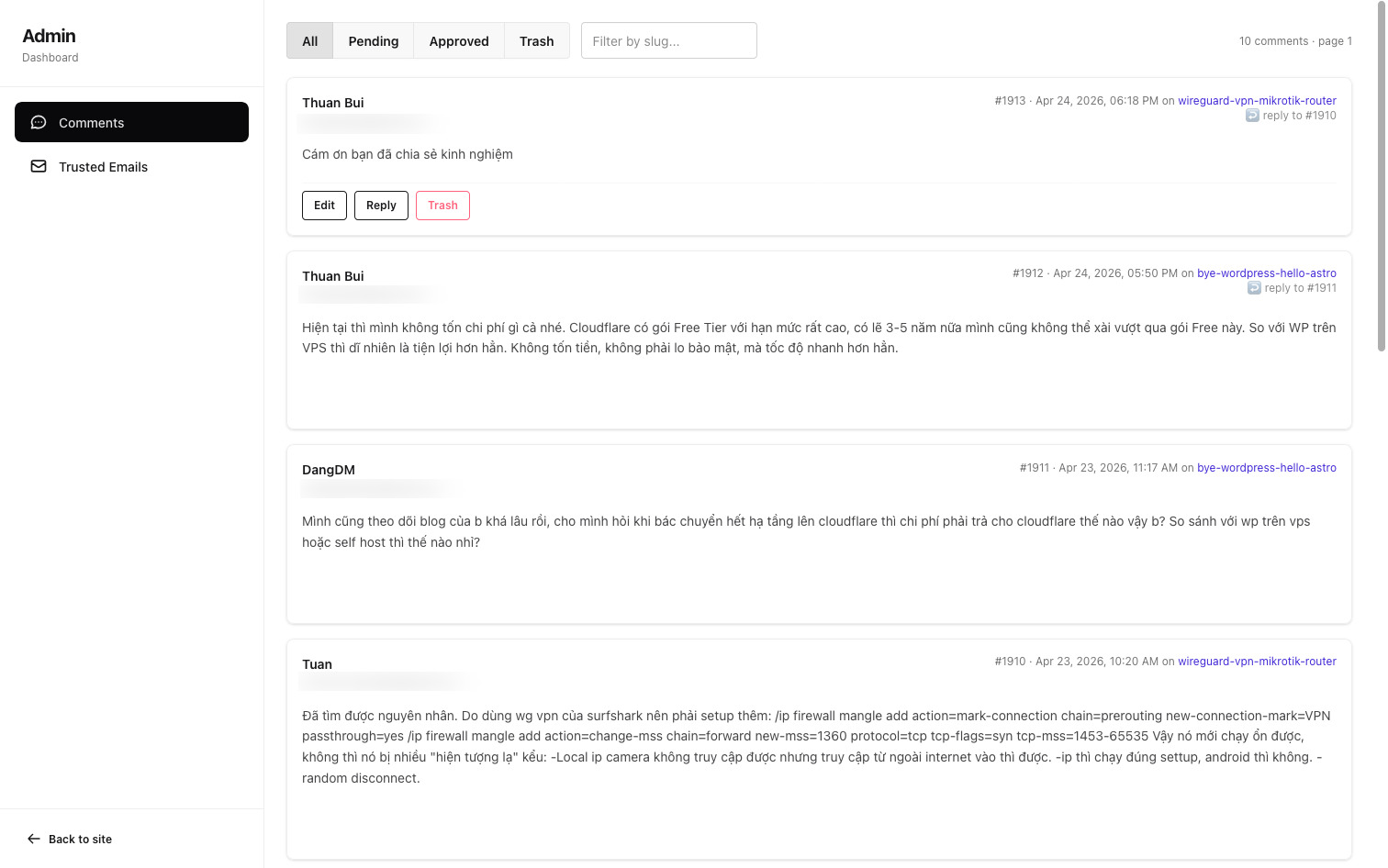
Tab này hỗ trợ:
- Lọc theo trạng thái
all,pending,approved,trash - Tìm theo
slug - Phân trang
- Approve comment
- Edit comment
- Reply với tư cách admin
- Chuyển comment vào thùng rác
- Xóa vĩnh viễn
2. Tab Trusted Emails
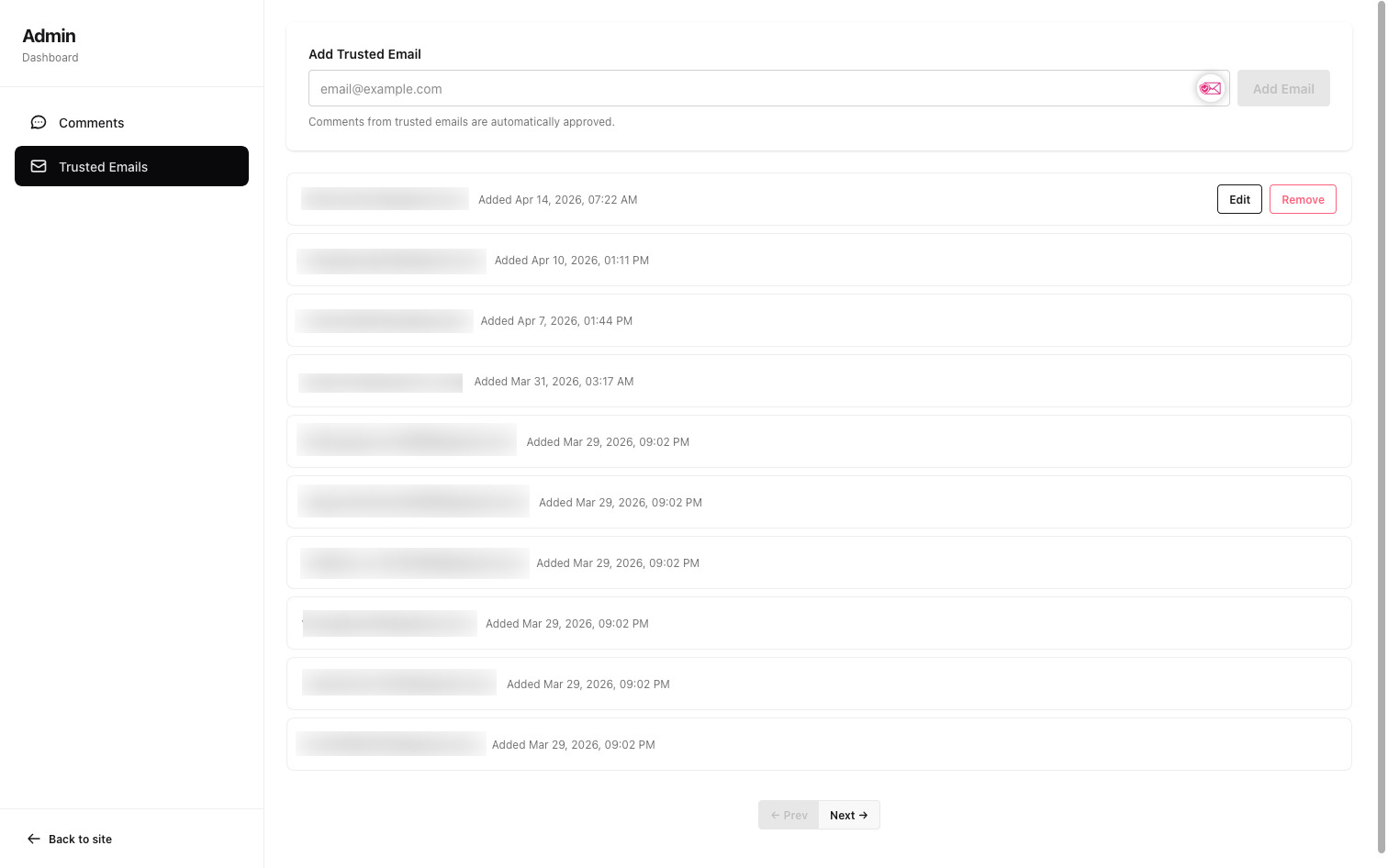
Tab thứ hai dùng để quản lý danh sách email được auto-approve.
Tại đây mình có thể:
- Xem danh sách email đã được trusted
- Thêm email mới vào danh sách
- Sửa email
- Xóa email khỏi danh sách trusted
Khi một email nằm trong bảng trusted_emails, các comment mới từ email đó sẽ được duyệt ngay mà không cần chờ xét duyệt.
3. Modal edit và reply
Để thao tác nhanh hơn, mình dùng modal cho hai tác vụ:
- Edit comment
- Reply as Admin
Khi reply từ dashboard, comment của admin sẽ được insert trực tiếp vào bảng comments với status = 1, tức là hiển thị ngay lập tức trên frontend.
VI. Tạo Admin API cho comment
Phần quan trọng nhất của dashboard nằm ở API /api/admin/comments.
1. API lấy danh sách comment
File: src/pages/api/admin/comments.ts
import type { APIContext } from "astro";import { drizzle } from "drizzle-orm/d1";import { eq, desc, like, lt, and } from "drizzle-orm";import { env } from "cloudflare:workers";import { comments } from "@/db/schema";import { getCursorPagination } from "./pagination";
export const prerender = false;
const SELECT_FIELDS = {  id: comments.id,  postSlug: comments.postSlug,  authorName: comments.authorName,  authorEmail: comments.authorEmail,  authorUrl: comments.authorUrl,  content: comments.content,  createdAt: comments.createdAt,  status: comments.status,  parentId: comments.parentId,};
// ─── GET: Paginated comments ──────────────────────────────────────────────export async function GET({ request }: APIContext) {  const url = new URL(request.url);  const { limit, cursor } = getCursorPagination(url);  const statusFilter = url.searchParams.get("status"); // "pending" | "approved" | "deleted" | null  const slugFilter = url.searchParams.get("slug")?.toLowerCase();
  try {    const db = drizzle(env.COMMENTS_DB);
    const conditions = [];    if (statusFilter === "pending") conditions.push(eq(comments.status, 0));    else if (statusFilter === "approved")      conditions.push(eq(comments.status, 1));    else if (statusFilter === "trash") conditions.push(eq(comments.status, 2));    if (slugFilter) conditions.push(like(comments.postSlug, `%${slugFilter}%`));    if (cursor !== null) conditions.push(lt(comments.id, cursor));
    const where = conditions.length > 0 ? and(...conditions) : undefined;
    const rows = await db      .select(SELECT_FIELDS)      .from(comments)      .where(where)      .orderBy(desc(comments.id))      .limit(limit + 1);
    const hasMore = rows.length > limit;    const items = hasMore ? rows.slice(0, limit) : rows;    const nextCursor = hasMore ? items[items.length - 1].id : null;
    return new Response(      JSON.stringify({ comments: items, hasMore, nextCursor }),      { status: 200, headers: { "Content-Type": "application/json" } }    );  } catch (error) {    console.error("Admin GET comments error:", error);    return new Response(JSON.stringify({ error: "Database error" }), {      status: 500,      headers: { "Content-Type": "application/json" },    });  }}
API này hỗ trợ:
limitcursorstatusslug
Ví dụ:
GET /api/admin/comments?status=pending&slug=astro&limit=10&cursor=120Logic chính:
- Nếu có
status, thêm điều kiện lọc theo trạng thái - Nếu có
slug, dùnglikeđể tìm gần đúng theopost_slug - Nếu có
cursor, chỉ lấy những comment cóid < cursor - Sắp xếp
id DESC - Lấy
limit + 1bản ghi để biết còn trang tiếp theo hay không
const rows = await db .select(SELECT_FIELDS) .from(comments) .where(where) .orderBy(desc(comments.id)) .limit(limit + 1);2. API duyệt, chỉnh sửa, xoá tạm và xoá vĩnh viễn comment
File: src/pages/api/admin/comments/[id].ts
import type { APIContext } from "astro";import { drizzle } from "drizzle-orm/d1";import { eq } from "drizzle-orm";import { env } from "cloudflare:workers";import { comments, trustedEmails } from "@/db/schema";
export const prerender = false;
// ─── PATCH: Update comment (approve/delete/edit) ─────────────────────────export async function PATCH({ params, request }: APIContext) {  const id = parseInt(params.id || "");  if (!id || id <= 0) {    return new Response(JSON.stringify({ error: "Invalid comment ID" }), {      status: 400,      headers: { "Content-Type": "application/json" },    });  }
  let body: {    status?: number;    content?: string;    authorName?: string;    authorEmail?: string;    authorUrl?: string | null;  };  try {    body = await request.json();  } catch {    return new Response(JSON.stringify({ error: "Invalid JSON" }), {      status: 400,      headers: { "Content-Type": "application/json" },    });  }
  const { status, content, authorName, authorEmail, authorUrl } = body;
  // Validate status if provided  if (status !== undefined && ![0, 1, 2].includes(status)) {    return new Response(      JSON.stringify({        error: "Status must be 0 (pending), 1 (approved), or 2 (deleted)",      }),      { status: 400, headers: { "Content-Type": "application/json" } }    );  }
  // Validate email format if provided  if (authorEmail !== undefined) {    const emailRegex = /^[^\s@]+@[^\s@]+\.[^\s@]+$/;    if (!emailRegex.test(authorEmail)) {      return new Response(JSON.stringify({ error: "Invalid email format" }), {        status: 400,        headers: { "Content-Type": "application/json" },      });    }  }
  // Validate URL format if provided  if (authorUrl !== undefined && authorUrl !== null && authorUrl !== "") {    try {      new URL(authorUrl);    } catch {      return new Response(JSON.stringify({ error: "Invalid URL format" }), {        status: 400,        headers: { "Content-Type": "application/json" },      });    }  }
  try {    const db = drizzle(env.COMMENTS_DB);
    // Build update fields    const updates: Record<string, unknown> = {};    if (status !== undefined) updates.status = status;    if (content !== undefined) updates.content = content.trim();    if (authorName !== undefined) updates.authorName = authorName.trim();    if (authorEmail !== undefined)      updates.authorEmail = authorEmail.toLowerCase().trim();    if (authorUrl !== undefined) updates.authorUrl = authorUrl?.trim() ?? null;
    if (Object.keys(updates).length === 0) {      return new Response(JSON.stringify({ error: "No fields to update" }), {        status: 400,        headers: { "Content-Type": "application/json" },      });    }
    // Fetch comment first (needed for email on approve + KV invalidation)    const [comment] = await db      .select({        id: comments.id,        authorEmail: comments.authorEmail,        postSlug: comments.postSlug,        status: comments.status,      })      .from(comments)      .where(eq(comments.id, id))      .limit(1);
    if (!comment) {      return new Response(JSON.stringify({ error: "Comment not found" }), {        status: 404,        headers: { "Content-Type": "application/json" },      });    }
    // Update the comment    await db.update(comments).set(updates).where(eq(comments.id, id));
    // Invalidate KV cache for this post — visible comments have changed    await env.COMMENTS_CACHE.delete(`comments:${comment.postSlug}`);
    // On approve: add email to trusted_emails if not already there    if (status === 1 && comment.status !== 1) {      const normalizedEmail = comment.authorEmail.toLowerCase();      const existing = await db        .select({ id: trustedEmails.id })        .from(trustedEmails)        .where(eq(trustedEmails.email, normalizedEmail))        .limit(1);
      if (existing.length === 0) {        await db.insert(trustedEmails).values({          email: normalizedEmail,          addedAt: new Date().toISOString(),        });      }    }
    return new Response(JSON.stringify({ success: true }), {      status: 200,      headers: { "Content-Type": "application/json" },    });  } catch (error) {    console.error("Admin PATCH comment error:", error);    return new Response(JSON.stringify({ error: "Database error" }), {      status: 500,      headers: { "Content-Type": "application/json" },    });  }}
// ─── DELETE: Hard delete a comment ───────────────────────────────────────export async function DELETE({ params }: APIContext) {  const id = parseInt(params.id || "");  if (!id || id <= 0) {    return new Response(JSON.stringify({ error: "Invalid comment ID" }), {      status: 400,      headers: { "Content-Type": "application/json" },    });  }
  try {    const db = drizzle(env.COMMENTS_DB);
    // Fetch postSlug before deleting so we can invalidate KV    const [comment] = await db      .select({ postSlug: comments.postSlug })      .from(comments)      .where(eq(comments.id, id))      .limit(1);
    await db.delete(comments).where(eq(comments.id, id));
    if (comment) {      await env.COMMENTS_CACHE.delete(`comments:${comment.postSlug}`);    }
    return new Response(JSON.stringify({ success: true }), {      status: 200,      headers: { "Content-Type": "application/json" },    });  } catch (error) {    console.error("Admin DELETE comment error:", error);    return new Response(JSON.stringify({ error: "Database error" }), {      status: 500,      headers: { "Content-Type": "application/json" },    });  }}
Endpoint này xử lý hai method:
PATCHđể update commentDELETEđể xóa vĩnh viễn
Khi PATCH, API có thể:
- đổi
status - sửa
content - sửa
authorName - sửa
authorEmail - sửa
authorUrl
Có 2 chi tiết đáng chú ý:
a. Khi approve comment, tự thêm email vào trusted list
Nếu comment đang ở trạng thái pending mà được chuyển sang approved, email của người comment sẽ tự động được thêm vào bảng trusted_emails nếu chưa tồn tại.
Điều này giúp các comment sau từ cùng email đó được auto-approve.
b. Mỗi lần moderation thay đổi, phải xóa KV cache
Frontend public đang lấy comment từ KV cache. Vì vậy, mỗi lần xét duyệt, chỉnh sửa hoặc xoá comment, cần xóa cache của bài viết tương ứng:
await env.COMMENTS_CACHE.delete(`comments:${comment.postSlug}`);Bước này cực kỳ quan trọng vì nếu quên bổ sung, frontend sẽ không bao giờ được cập nhật hiển thị comment mới cho đến khi KV Cache được xoá thủ công.
VII. Reply comment với tư cách admin
Thay vì trả lời comment bằng tay trong database, mình tạo thêm API endpoint để trả lời trực tiếp các comment trong quản trị
POST /api/admin/comments/replyFile src/pages/api/admin/comments/reply.ts
import type { APIContext } from "astro";import { drizzle } from "drizzle-orm/d1";import { eq, and } from "drizzle-orm";import { env } from "cloudflare:workers";import { comments, trustedEmails } from "@/db/schema";import { SITE } from "@/config";
export const prerender = false;
// ─── POST: Reply as admin ────────────────────────────────────────────────export async function POST({ request }: APIContext) {  let body: { postSlug?: string; parentId?: number; content?: string };  try {    body = await request.json();  } catch {    return new Response(JSON.stringify({ error: "Invalid JSON" }), {      status: 400,      headers: { "Content-Type": "application/json" },    });  }
  const { postSlug, parentId, content } = body;
  if (!postSlug?.trim() || !content?.trim()) {    return new Response(      JSON.stringify({ error: "postSlug and content are required" }),      { status: 400, headers: { "Content-Type": "application/json" } }    );  }
  const adminEmail = env.ADMIN_EMAIL;  if (!adminEmail) {    return new Response(      JSON.stringify({ error: "ADMIN_EMAIL not configured" }),      { status: 500, headers: { "Content-Type": "application/json" } }    );  }
  try {    const db = drizzle(env.COMMENTS_DB);
    const [inserted] = await db      .insert(comments)      .values({        postSlug: postSlug.trim(),        authorName: SITE.author,        authorEmail: adminEmail.toLowerCase(),        content: content.trim(),        createdAt: new Date().toISOString(),        status: 1, // Auto-approved        parentId: parentId ?? null,      })      .returning();
    // Auto-approve the parent comment if it's still pending    if (parentId) {      const [parent] = await db        .select({ id: comments.id, authorEmail: comments.authorEmail })        .from(comments)        .where(and(eq(comments.id, parentId), eq(comments.status, 0)))        .limit(1);
      if (parent) {        await db          .update(comments)          .set({ status: 1 })          .where(and(eq(comments.id, parentId), eq(comments.status, 0)));
        // Add parent's email to trusted_emails so future comments are auto-approved        const normalizedEmail = parent.authorEmail.toLowerCase();        const existing = await db          .select({ id: trustedEmails.id })          .from(trustedEmails)          .where(eq(trustedEmails.email, normalizedEmail))          .limit(1);
        if (existing.length === 0) {          await db.insert(trustedEmails).values({            email: normalizedEmail,            addedAt: new Date().toISOString(),          });        }      }    }
    // Invalidate public KV cache — admin reply is auto-approved and must appear immediately    await env.COMMENTS_CACHE.delete(`comments:${postSlug.trim()}`);
    return new Response(JSON.stringify({ success: true, comment: inserted }), {      status: 201,      headers: { "Content-Type": "application/json" },    });  } catch (error) {    console.error("Admin reply error:", error);    return new Response(JSON.stringify({ error: "Database error" }), {      status: 500,      headers: { "Content-Type": "application/json" },    });  }}
Payload gồm:
{ "postSlug": "comment-astro-phan-1", "parentId": 123, "content": "Cảm ơn bạn, mình sẽ cập nhật ở phần sau nhé."}Khi gọi endpoint này, hệ thống sẽ:
- Insert một comment mới với tư cách admin
- Gán
authorNametheoSITE.author - Gán
authorEmailtheo biến môi trườngADMIN_EMAIL - Đặt
status = 1để comment hiển thị ngay - Gắn
parentIdđể tạo reply đúng với commment gốc
VIII. Quản lý ADMIN_EMAIL
Để trả lời comment với tư cách admin, mình thêm biến ADMIN_EMAIL vào Astro config:
env: { schema: { ADMIN_EMAIL: envField.string({ access: "secret", context: "server", }), },},Sau đó chạy lại:
pnpm wrangler typesđể worker-configuration.d.ts bổ sung thêm khai báo:
interface Env { COMMENTS_DB: D1Database; COMMENTS_CACHE: KVNamespace; ADMIN_EMAIL: string;}Trên production, mình tạo thêm secret bằng lệnh sau
pnpm wrangler secret put ADMIN_EMAILChặn ADMIN_EMAIL trên form comment ở front-end
Về lý thuyết, bất kỳ ai cũng có thể dùng email admin của mình để gửi comment mới thông qua comment form trong các bài viết.
Vì vậy trong file src/pages/api/comments/[slug].ts, mình bổ sung thêm mã để chặn trường hợp này
// Block admin email from being used in frontend commentsconst adminEmail = import.meta.env.ADMIN_EMAIL?.toLowerCase();if (adminEmail && authorEmail.trim().toLowerCase() === adminEmail) { return new Response(JSON.stringify({ error: "This email is reserved" }), { status: 403, headers: { "Content-Type": "application/json" }, });}IX. Tối ưu database cho dashboard
Ở phần 2, mình đã tạo index cho public comment API.
Để tối ưu truy vấn ở quản trị, mình bổ sung thêm hai index mới:
CREATE INDEX comments_status_id_idx ON comments (status, id);CREATE INDEX comments_post_slug_idx ON comments (post_slug);Lý do:
- Dashboard thường lọc theo
status - Dashboard cũng hay tìm theo
post_slug - Phân trang dựa trên
id DESC
Nhờ đó các các truy vấn comment vào database sẽ nhanh hơn nhiều khi số lượng comment tăng lên.
Cập nhật file src/db/schema.ts
table => [ index("idx_comments_slug_status_created").on( table.postSlug, table.status, table.createdAt ), index("comments_status_id_idx").on(table.status, table.id), index("comments_post_slug_idx").on(table.postSlug),];X. Tạo API quản lý trusted emails
Ngoài comment, mình cũng tạo nhóm API riêng cho trusted_emails:
GET /api/admin/trusted-emailsPOST /api/admin/trusted-emailsPATCH /api/admin/trusted-emails/{id}DELETE /api/admin/trusted-emails/{id}
File src/pages/api/admin/trusted-emails.ts
import type { APIContext } from "astro";import { drizzle } from "drizzle-orm/d1";import { desc, lt } from "drizzle-orm";import { env } from "cloudflare:workers";import { trustedEmails } from "@/db/schema";import { getCursorPagination } from "./pagination";
export const prerender = false;
// ─── GET: Paginated trusted emails ───────────────────────────────────────export async function GET({ request }: APIContext) {  const { limit, cursor } = getCursorPagination(new URL(request.url));
  try {    const db = drizzle(env.COMMENTS_DB);
    const where = cursor !== null ? lt(trustedEmails.id, cursor) : undefined;
    const rows = await db      .select()      .from(trustedEmails)      .where(where)      .orderBy(desc(trustedEmails.id))      .limit(limit + 1);
    const hasMore = rows.length > limit;    const items = hasMore ? rows.slice(0, limit) : rows;    const nextCursor = hasMore ? items[items.length - 1].id : null;
    return new Response(      JSON.stringify({ emails: items, hasMore, nextCursor }),      { status: 200, headers: { "Content-Type": "application/json" } }    );  } catch (error) {    console.error("Admin GET trusted emails error:", error);    return new Response(JSON.stringify({ error: "Database error" }), {      status: 500,      headers: { "Content-Type": "application/json" },    });  }}
// ─── POST: Add a trusted email ───────────────────────────────────────────export async function POST({ request }: APIContext) {  let body: { email?: string };  try {    body = await request.json();  } catch {    return new Response(JSON.stringify({ error: "Invalid JSON" }), {      status: 400,      headers: { "Content-Type": "application/json" },    });  }
  const { email } = body;  if (!email?.trim()) {    return new Response(JSON.stringify({ error: "Email is required" }), {      status: 400,      headers: { "Content-Type": "application/json" },    });  }
  const emailRegex = /^[^\s@]+@[^\s@]+\.[^\s@]+$/;  if (!emailRegex.test(email)) {    return new Response(JSON.stringify({ error: "Invalid email format" }), {      status: 400,      headers: { "Content-Type": "application/json" },    });  }
  try {    const db = drizzle(env.COMMENTS_DB);
    const [inserted] = await db      .insert(trustedEmails)      .values({        email: email.trim().toLowerCase(),        addedAt: new Date().toISOString(),      })      .returning();
    return new Response(JSON.stringify({ success: true, email: inserted }), {      status: 201,      headers: { "Content-Type": "application/json" },    });  } catch (error: unknown) {    const message = error instanceof Error ? error.message : String(error);    if (message.includes("UNIQUE")) {      return new Response(JSON.stringify({ error: "Email already exists" }), {        status: 409,        headers: { "Content-Type": "application/json" },      });    }    console.error("Admin POST trusted email error:", message);    return new Response(JSON.stringify({ error: "Database error" }), {      status: 500,      headers: { "Content-Type": "application/json" },    });  }}
Các API này dùng để
- xác thực email
- insert/update/delete trên bảng
trusted_emails - bắt lỗi unique nếu email đã tồn tại
XI. Seed dữ liệu local để test dashboard
Mình tạo thêm script scripts/seed-comments.mjs để generate khoảng 1000 comment mẫu, nhằm mục đích thử nghiệm trên local
File scripts/seed-comments.mjs
/** * Generates a SQL file with 1000 seed comments for local D1 testing. * Run: node scripts/seed-comments.mjs | pnpm wrangler d1 execute blog-thuanbui-comments --local --file=- * Or:  node scripts/seed-comments.mjs > /tmp/seed.sql && pnpm wrangler d1 execute blog-thuanbui-comments --local --file=/tmp/seed.sql */
const slugs = [  "wordpress-to-astro-phan-1",  "wordpress-to-astro-phan-2",  "wordpress-to-astro-phan-3",  "wordpress-to-astro-phan-4",  "wordpress-to-astro-phan-5",  "wg-easy-wireguard-vpn-server-web-ui",  "uptime-kuma",  "xcp-ng-storage-repository",  "docker-compose-co-ban",  "nginx-proxy-manager",  "ubuntu-20-04-cloud-init-pxe-boot-server",  "triple-boot-hackintosh-macos-sonoma-windows-11-endeavouros-linux",];
const names = [  "Nguyễn Văn An",  "Trần Thị Bình",  "Lê Hoàng Cường",  "Phạm Minh Dũng",  "Hoàng Thị Lan",  "Võ Quang Huy",  "Đặng Văn Khoa",  "Bùi Thị Mai",  "Đinh Trọng Nam",  "Ngô Thị Phương",  "Lý Văn Quân",  "Trương Thị Rượu",  "Phan Minh Sơn",  "Cao Thị Thanh",  "Vũ Đức Tuấn",  "Hà Thị Uyên",  "Mai Văn Vinh",  "Lâm Thị Xuân",  "Tạ Quang Yên",  "Dương Văn Zũng",  "Alice Nguyen",  "Bob Tran",  "Charlie Le",  "Dave Pham",  "Eve Hoang",  "Frank Vo",  "Grace Dang",  "Henry Bui",  "Ivan Dinh",  "Julia Ngo",];
const emails = names.map(n => {  const ascii = n    .normalize("NFD")    .replace(/[\u0300-\u036f]/g, "")    .replace(/đ/gi, "d")    .replace(/\s+/g, ".")    .toLowerCase();  return `${ascii}@example.com`;});
const contents = [  "Bài viết rất hay và chi tiết, cảm ơn tác giả đã chia sẻ!",  "Mình đã làm theo hướng dẫn và thành công. Rất hữu ích!",  "Cho mình hỏi thêm về bước cấu hình network, mình bị lỗi ở đây.",  "Tuyệt vời! Đây là bài viết mình đang tìm kiếm từ lâu.",  "Cảm ơn bạn rất nhiều, bài viết giải thích rất dễ hiểu.",  "Mình thử rồi nhưng gặp lỗi 'permission denied', bạn có thể giúp không?",  "Great article! Very helpful for my homelab setup.",  "Thanks for the detailed guide. Worked perfectly on my setup.",  "I had some issues with the Docker networking part but figured it out.",  "Could you also cover the backup strategy for this setup?",  "Bài viết này giúp mình tiết kiệm rất nhiều thời gian nghiên cứu.",  "Nội dung chuyên sâu và thực tiễn, sẽ áp dụng ngay vào dự án.",  "Phần giải thích về cấu hình rất rõ ràng, dễ làm theo.",  "Mình đã follow blog của bạn từ lâu, luôn có nội dung chất lượng.",  "Cảm ơn vì đã share kinh nghiệm thực tế, không chỉ lý thuyết suông.",];
const rows = [];const now = new Date();
for (let i = 0; i < 1000; i++) {  const slug = slugs[i % slugs.length];  const name = names[i % names.length];  const email = emails[i % emails.length];  const content = contents[i % contents.length];  const status = i % 10 === 0 ? 2 : i % 3 === 0 ? 1 : 0; // ~33% approved, ~10% deleted, rest pending  const daysAgo = Math.floor(Math.random() * 365);  const hoursAgo = Math.floor(Math.random() * 24);  const date = new Date(now);  date.setDate(date.getDate() - daysAgo);  date.setHours(date.getHours() - hoursAgo);  const createdAt = date.toISOString();
  // ~15% are replies to a previous comment  const parentId =    i > 5 && i % 7 === 0      ? Math.max(1, i - Math.floor(Math.random() * 5))      : "NULL";
  const escaped = s => s.replace(/'/g, "''");
  rows.push(    `('${escaped(slug)}', '${escaped(name)}', '${escaped(email)}', NULL, '${escaped(content)}', '${createdAt}', ${status}, ${parentId})`  );}
const BATCH = 100;const parts = [];for (let i = 0; i < rows.length; i += BATCH) {  const batch = rows.slice(i, i + BATCH);  parts.push(    `INSERT INTO comments (post_slug, author_name, author_email, author_url, content, created_at, status, parent_id) VALUES\n${batch.join(",\n")};`  );}
process.stdout.write(parts.join("\n") + "\n");
Chạy lệnh sau để tạo comment
node scripts/seed-comments.mjs | pnpm wrangler d1 execute blog-thuanbui-comments --local --file=-Script sẽ tạo dữ liệu test gồm:
- nhiều
postSlugkhác nhau - nhiều email và author name khác nhau
- tỷ lệ
pending,approved,trash - một phần comment có
parentIdđể test reply
Đây là cách rất tiện để thử nghiệm trang quản trị trong môi trường local trước khi đẩy lên production.
XII. Thử nghiệm trên local
Quy trình local mình dùng như sau:
1. Apply migration local
pnpm run db:migrate:local2. Seed dữ liệu test
node scripts/seed-comments.mjs | pnpm wrangler d1 execute blog-thuanbui-comments --local --file=-3. Chạy dev server
pnpm run dev4. Mở dashboard
http://localhost:4321/admin/commentsKiểm tra các tình huông sau:
- Approve một comment pending
- Sửa nội dung comment
- Reply vào comment pending
- Kiểm tra email có được thêm vào
trusted_emailskhông - Xem comment public có được refresh sau khi KV cache bị xóa không
XIII. Triển khai lên production
Sau khi thử nghiệm ổn trên local, mình sẽ triển khai lên production
1. Apply migration production
pnpm run db:migrate:prod2. Thêm secret cho admin
pnpm wrangler secret put ADMIN_EMAIL3. Cập nhật code lên Cloudflare Workers
Chỉ cần push code lên GitHub, Cloudflare sẽ tự build và deploy như bình thường.
4. Thiết lập Cloudflare Zero Trust
Tạo applicaion mới để bảo vệ:
/admin/*/api/admin/*
Sau đó thử lại các đường dẫn:
/admin/comments/admin/trusted-emails/api/admin/comments
Nếu chưa xác thực, Cloudflare sẽ chặn request trước khi vào Worker.
XIV. Tổng kết
Sau phần này, hệ thống comment của blog đã có đầy đủ 3 lớp quan trọng:
- Phần 1: nền tảng comment với D1 + Drizzle + Svelte island
- Phần 2: tối ưu hiệu năng bằng KV cache và index
- Phần 3: dashboard để duyệt comment và quản lý trusted emails, bảo vệ bằng Cloudflare Zero Trust
Kết quả mình có được:
- Có giao diện riêng để quản trị comment
- Có thể approve, edit, trash, delete và reply trực tiếp
- Tự động thêm trusted email khi approve hoặc khi admin reply
- KV cache được invalidate đúng lúc nên frontend luôn hiển thị dữ liệu mới
- Khu vực admin được bảo vệ bằng Cloudflare Zero Trust thay vì phải tự triển khai phần xác thực tài khoản.
Hy vọng bài viết này giúp bạn hoàn thiện mảnh ghép cuối cùng cho hệ thống comment tự xây dựng cho Astro.
Hẹn gặp lại!